DARCARS Nissan of Rockville

Blog

How to Parallel Park (Even If It's Not on the Maryland Driver's Test)

Parallel Parking in Maryland
We have all dreaded learning how to parallel park, and sometimes we are tempted to find another parking spot elsewhere. But fear not. At DARCARS Nissan of Rockville, we want you to feel confident grabbing that parallel spot anywhere around Rockville, MD, or wherever your Nissan takes you.

Perks of Knowing How to Parallel Park in Rockville, MD

You may be wondering why you need to know this driving skill when you can find a nearby parking lot. In general, it helps you learn the size and length of your car. It also stops you from needing to drive around to find a spot you can enter head-first!

Get Your Car Into Position

Not all parking spots are created equal, and you need to find a long enough spot for you to maneuver into. Don't feel committed to a spot just because you've made the cars behind you wait while you evaluate your situation. Once you've found one, steer your car slowly to become parallel to the parked car in front of your space. There should be about 2-3 feet between the side of your vehicle and the parked car.

Check the Mirrors Before Backing Up

Use your left and right side mirrors and the rearview mirror to look for other moving traffic. When you are confident, no vehicles are in your blind spot, put the car in reverse.

Turning the Wheel

Begin reversing your vehicle slowly, turning your steering wheel as you back into the spot at an angle. As your car enters the space, slowly begin to straighten the steering wheel while continuing to move in reverse. Continue to check all mirrors, windows, and windshields. Once your vehicle's front end has passed the vehicle's back end, start turning the steering wheel fully to the opposite direction.

Check Your Distance

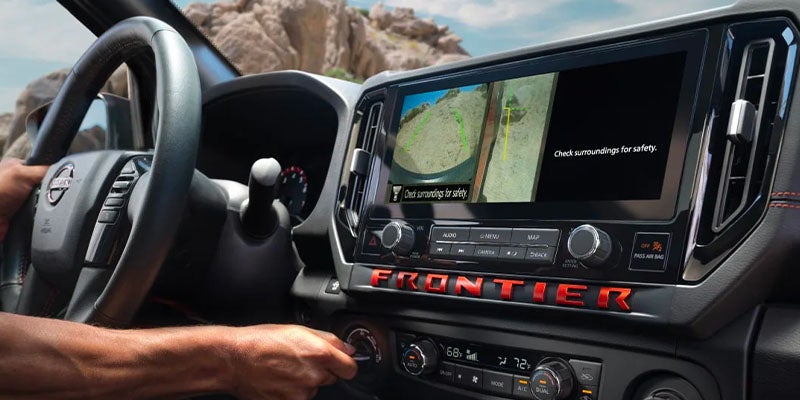
As you slowly inch backward, begin straightening the steering wheel. Continually check the rearview mirror to check how close your own vehicle is to the vehicle parked behind you. Using a backup camera is a useful tool but does not replace checking your mirrors. You should also make sure your final position will be no more than 18 inches away from the curb.

Adjust the Position of Your Vehicle

If you find your car is still at an angle and not yet parallel with the curb, you may need to continue adjusting. Turning your wheel right or left and inching forward or backward can help you straighten out. Once your vehicle is straight and close to the curb, move forward or back to try to get into the center of the space.   As with all things, learning to park in parallel spots becomes easier with practice. If you're in the market for a vehicle with the most state-of-the-art parking features, head on over to DARCARS Nissan of Rockville or learn about the many Nissan models with park assist technology, like the Nisan Rouge, ARIYA, and the Altima!


Recommended Posts

2025 Nissan Altima ProPILOT Assist

Understanding Nissan's ProPILOT Assist: Semi-Autonomous Driving

Advanced driver assistance systems are increasingly popular in modern vehicles. Among some of the most impressive available technologies is Nissan ProPILOT Assist, a semi-autonomous driving assistant that helps with freeway navigation and efficiency. Experience Smarter Highway Driving with ProPILOT Assist ProPILOT Assist is a driving assistant built around cruise control and lane centering technology. This hands-on driving assistant streamlines highway cruising by automatically controlling your steering, acceleration, and braking so you get the benefit of less fatigue behind the wheel, particularly on long commutes and roadtrips. ProPILOT Assist uses an adaptive cruise control system that allows your vehicle to keep pace with the car ahead while also maintaining a safe following distance so your Nissan has enough time to come to a complete stop. When this system is active, it can bring your vehicle to a stop, hold position, and then resume traffic speed, which is ideal in congested traffic. more ProPILOT Assist with Navi-Link On some Nissan models, the ProPILOT driving assistant is paired with an integrated navigation system for predictive speed adjustment. Navigation data is used to predict when to slow down the vehicle so that your Nissan can glide along curves in the road more safely. This system can also be used to reduce your travel speed when entering off-ramps. Drivers have the option of adjusting the cruising speed on a dime to match posted speed limit signs. ProPILOT Assist 2.0 If your Nissan is equipped with ProPILOT Assist 2.0, you get the benefit of route assistance with freeway mapping on compatible roads. This advanced ProPILOT Assist system uses 360-degree road monitoring with radar and sonar information, as well as 3D road mapping, to assess upcoming curves on the road to your next destination for even greater precision. The 2.0 system has built-in lane change assistance technology that allows you to overtake other vehicles on the road at the push of a button. All you have to do is keep your hands on the wheel, activate the lane change system, and allow the advanced traffic and mapping data to plan how to get around slower-moving vehicles so you can resume your preferred travel speed on the highway. ProPILOT Assist 2.1 The latest advancement in the ProPILOT Assist family of technologies is the 2.1 system, which enables hand and foot-free semi-autonomous driving. With this system, you can comfortably take your hands off the wheel and your feet off the foot pedals while your car essentially drives itself on compatible roads. Like the 2.0 system, when your hands are on the wheel, you can overtake other cars at the push of a button. ProPILOT Assist technology, found on models like the ARIYA and the upper Rogue trims, streamlines your daily commute with intelligent software that controls cruise control and steering. Test out this advanced system when you visit DARCARS Nissan of Rockville in Rockville, MD.

2025 Nissan Rogue

Four Favorite Features of the 2025 Nissan Rogue

A mid-size crossover SUV like the 2025 Nissan Rogue is an ideal model for adventurous drivers and growing families. This Nissan model has an exceptionally efficient and powerful powertrain, smart safety technology, and features crafted for reliable off-road performance. Learn about the best features of the Rogue to see why it's a great pick for your next vehicle upgrade. 1. High-Powered Powertrain The Rogue has a competitive fuel economy with estimates like 30 MPG in the city, 37 MPG on the highway, and 33 MPG combined. The key to this efficiency is the increased air intake delivered to the 1.5-liter turbo, three-cylinder motor. This turbocharged engine generates an output of 201 horsepower and 225 lb-ft of torque. The output of the powertrain can be augmented on the fly with two Selectable Terrain Modes. Turning on the Eco mode is ideal for long-range driving when you want to maximize fuel economy, while switching to the Sport mode enhances aggressive acceleration. more 2. Intelligent All-Wheel Drive While a front-wheel drivetrain is standard for this model, drivers can opt for the available Intelligent All-Wheel Drive when the Rogue is custom-ordered. The Intelligent AWD system maximizes traction on all four wheels for stable handling, but can seamlessly switch to two-wheel power when you don't need added traction. A sophisticated sensor system continually monitors the condition of the road to adjust power distribution between the front and rear drive axles. 3. Driver Assistance Software The Rogue is equipped with a Blind Spot Warning system on the base model, which is upgraded with Blind Spot Intervention on trims like the SL. The basic blind spot detection system warns the driver when a vehicle occupies the blind zone. The additional intervention system actively prevents lane change maneuvers that could cause an accident when the SUV's blind spot is occupied. Upper models also have additional high-tech safety systems, like an Intelligent Around View Monitor and Traffic Sign Recognition System. The Traffic Sign Recognition System uses cameras to identify posted speed limit recommendations and automatically adjust the cruise control speed to match the speed limit. The Intelligent Around View Monitor provides a 360-degree aerial view of the SUV for more precise parking and maneuvering on tight streets or trails. 4. NissanConnect The Rogue makes it easy to stream your favorite music with standard wireless Bluetooth audio streaming, which can be managed on the NissanConnect central display. On the upper models, the central touchscreen is upgraded with a 12.3-inch display, along with smartphone-integrated apps, Google Maps, and Amazon Alexa. Whether you're traveling off-road or driving in the suburbs, a well-rounded performer like the Nissan Rogue is a terrific model. Test out this model when you visit DARCARS Nissan of Rockville in Rockville, MD.

Nissan Safety Shield 360

Understanding Nissan Safety Shield 360: Advanced Safety Features

Nissan Safety Shield 360 is a suite of six advanced safety systems installed in every Nissan. These systems are designed to make driving safer and easier by warning you of potential accidents so you can avoid them. We're going to look at how a few of these systems work. Automatic Emergency Braking w/ Pedestrian Detection While you automatically watch the vehicle ahead of you, you can be momentarily distracted, and the other vehicle might slow down or stop. If this happens, you may not be able to react until it's too late. This system uses a camera and radar to continually monitor the distance between your Nissan and the vehicle in front. It's also sensitive enough to detect a pedestrian that might move in front of your car with little warning. If the system determines you're too close to another vehicle or pedestrian, a warning alarm will sound and an icon will appear on the screen to alert you of the danger. If you can't react fast enough, emergency braking engages to stop you. While hard braking might not be able to prevent a collision, it will reduce the damage caused. more Blind Spot Warning Blind spots have always been dangerous, as they're the areas around your vehicle that you can't easily see into. A car can easily enter a blind spot in the neighboring lane, and you might not see it when you're changing lanes until it's too late. This feature takes major stress out of driving as it uses dedicated sensors located on the rear sides that scan for approaching vehicles. When a sensor detects a vehicle approaching a blind spot, a warning chime sounds, and a light in the corresponding side view mirror housing flashes. Additionally, an icon of a car inside a triangle will appear on the side view mirror. These warnings give you sufficient time to turn back into your original lane or hit the brakes, preventing a collision. Rear Automatic Braking Sometimes when you reverse, you can't easily see potential obstacles, particularly if they're close to the ground. This system helps prevent accidents by alerting you to these otherwise hidden dangers. When you shift into reverse gear, sensors in the rear bumper activate and scan the area directly behind you for stationary objects. If anything is detected, the system provides visual and audio alerts. It will also apply hard braking to prevent you from hitting the object if you continue to reverse. The above systems, together with High Beam Assist, Rear Cross Traffic Alert, and Lane Departure Warning, may be complemented by additional safety features in your Nissan model. To learn more about any of these systems, contact us today at DARCARS Nissan of Rockville in Rockville, MD.