
DARCARS Nissan of Rockville

Blog / Nissan Technology

Blog

All Nissan Technology Rockville Nissan Dealer Learn About Nissan Models Learn About Nissan Cars Maintaining Your Nissan Tips & Tricks Rockville Nissan Service DARCARS Nissan of Rockville Service Nissan SUVs 2023 Nissan Cars Living in Maryland Nissan EVs Auto Repair Rockville MD Nissan Rogue Nissan Trucks Nissan LEAF Nissan Kicks Nissan Altima Nissan Frontier Nissan Murano Nissan Pathfinder Nissan Sentra Nissan Armada Nissan Versa Rockville Used Cars Used Nissan Dealer Buying a Car Tips & Tricks Nissan ARIYA Nissan Cars Nissan Oil Change Nissan Parts Rockville Trims and Features Nissan Accessories Nissan Colors Nissan Kicks Play Nissan Safety Features Nissan Z in Rockville Buy vs. Lease Car Emissions Checks Car Rental Rockville, MD Car Trade In Check Engine Light Collision Center in Rockville, MD Engine Service Flat Tire Gifting a Car Murano Trims New Tires Nissan CPO Nissan GT-R Nissan Lease Nissan Midnight Edition Nissan ProPILOT Assist Nissan TITAN Nissan Trims Scratch and Dent Repair Summer Maintenance Transmission Service Waxing Your Car Winter Maintenance
2025 Nissan Altima ProPILOT Assist

Understanding Nissan's ProPILOT Assist: Semi-Autonomous Driving

Advanced driver assistance systems are increasingly popular in modern vehicles. Among some of the most impressive available technologies is Nissan ProPILOT Assist, a semi-autonomous driving assistant that helps with freeway navigation and efficiency. Experience Smarter Highway Driving with ProPILOT Assist ProPILOT Assist is a driving assistant built around cruise control and lane centering technology. This hands-on driving assistant streamlines highway cruising by automatically controlling your steering, acceleration, and braking so you get the benefit of less fatigue behind the wheel, particularly on long commutes and roadtrips. ProPILOT Assist uses an adaptive cruise control system that allows your vehicle to keep pace with the car ahead while also maintaining a safe following distance so your Nissan has enough time to come to a complete stop. When this system is active, it can bring your vehicle to a stop, hold position, and then resume traffic speed, which is ideal in congested traffic. more ProPILOT Assist with Navi-Link On some Nissan models, the ProPILOT driving assistant is paired with an integrated navigation system for predictive speed adjustment. Navigation data is used to predict when to slow down the vehicle so that your Nissan can glide along curves in the road more safely. This system can also be used to reduce your travel speed when entering off-ramps. Drivers have the option of adjusting the cruising speed on a dime to match posted speed limit signs. ProPILOT Assist 2.0 If your Nissan is equipped with ProPILOT Assist 2.0, you get the benefit of route assistance with freeway mapping on compatible roads. This advanced ProPILOT Assist system uses 360-degree road monitoring with radar and sonar information, as well as 3D road mapping, to assess upcoming curves on the road to your next destination for even greater precision. The 2.0 system has built-in lane change assistance technology that allows you to overtake other vehicles on the road at the push of a button. All you have to do is keep your hands on the wheel, activate the lane change system, and allow the advanced traffic and mapping data to plan how to get around slower-moving vehicles so you can resume your preferred travel speed on the highway. ProPILOT Assist 2.1 The latest advancement in the ProPILOT Assist family of technologies is the 2.1 system, which enables hand and foot-free semi-autonomous driving. With this system, you can comfortably take your hands off the wheel and your feet off the foot pedals while your car essentially drives itself on compatible roads. Like the 2.0 system, when your hands are on the wheel, you can overtake other cars at the push of a button. ProPILOT Assist technology, found on models like the ARIYA and the upper Rogue trims, streamlines your daily commute with intelligent software that controls cruise control and steering. Test out this advanced system when you visit DARCARS Nissan of Rockville in Rockville, MD.
New Nissan Kicks Touchscreen Rockville, MD

How to Use NissanConnect®: Stay Connected with Your Vehicle

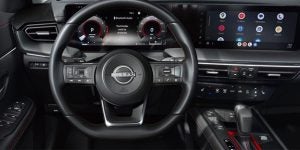
NissanConnect® transforms the way you experience driving, combining convenience, connectivity, and control. Explore this innovative system and stay in sync with your vehicle and the world around you, making every drive more enjoyable. Stay Connected on the Road Setting Up Getting started with NissanConnect® is as simple as creating an account and downloading the MyNISSAN app. If you buy a new Nissan, ask about enrolling when you purchase your car at the dealership, or if you prefer to enroll another time, just download the app and register a MyNISSAN Owner Portal Account. This handy app simplifies vehicle ownership by organizing all your important information in one place and giving you access to all your equipped NissanConnect® features. more Remote Programs Climate Control Stay cool in the summer and warm in the winter with the remote climate control functionality. You can warm up your Nissan before your morning commute and cool it down for your drive home, all remotely. Door Locking/Unlocking Did you get to your destination and forget to lock your car’s doors? With a simple tap on your phone, you can unlock or lock your Nissan remotely when using the MyNISSAN app. Engine Start/Stop Get your Nissan started ahead of time! You can start or turn off your vehicle conveniently. My Car Finder Perfect for large parking lots, this feature lets you locate your Nissan using your smartphone and remote GPS. Alerts Boundary With Boundary Alert, you can set a geographical boundary for your Nissan to easily monitor its location. Using the myNISSAN app, you will select an address, define the boundary's radius, and set departure and arrival times. You can also choose to receive notifications via email, text, or in-app push alerts when your Nissan crosses the boundary. Maintenance When a dashboard warning light turns on, the myNISSAN app will notify you. You can customize your notification preferences through the app or the owner's portal. Maintenance Alerts include a monthly vehicle health report that evaluates your Nissan performance, along with automatic maintenance reminders for upcoming service appointments. Speed Using myNISSAN or the owner portal, you can manually set a top speed threshold and choose through what avenues you receive notifications if the threshold is exceeded. Learn About More Innovative Nissan Features in Rockville, MD Visit DARCARS Nissan of Rockville, to explore our selection of premium Nissan models and experience these NissanConnect® features in person.

Nissan Altima Exterior Rockville, MD

How to Remote Start Your Nissan Altima

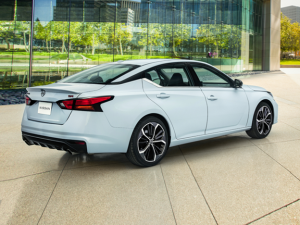
Having the ability to remote start your Nissan Altima can be a big convenience. It's great for warming up your vehicle in MD before hopping in to go about your daily adventures. Are you wondering how to use the remote start feature on your Altima? Remotely Starting Your Nissan Altima Using Nissan Remote Start with a Key Fob Using your remote start is simple. Using your remote key, press the lock button. Then, press and hold the engine start button until the vehicle starts. more In order for the remote start on your Nissan to work, you'll need to check a few things first. All of the vehicle's doors and windows must be closed and locked. The hood also must be closed as well, and the vehicle needs to be in park. You can't remotely start your vehicle from the inside out. Once a vehicle is started via a remote, it will run for a certain amount of time depending on the model before shutting off automatically. Checking Whether Your Altima Has Remote Start Many current Nissan models, as well as many models from recent years, have remote start. For instance, when looking at the 2024 Nissan Altima, you will find starting on the base Nissan Altima S that the car comes with a Remote Engine Start System. This gets found on the Altima SV and SR as well, and then on the Altima SR VC-Turbo and SL, you get Remote Engine Start System with Intelligent Climate Control. Remote Start with NissanConnect For some Altima models, the key fob is not the only option to remote start your vehicle. If a vehicle is equipped with NissanConnect technology, this can also be used to remote start the vehicle, as well as to enjoy other features. NissanConnect is a technology service that connects your vehicle to your mobile device via the MyNISSAN App. Once connected, you can use the smartphone app to remote start your car remotely from anywhere. You can also use the MyNISSAN App to lock and unlock your vehicle, set the temperature while remote starting your vehicle, and check your vehicle's location from anywhere. NissanConnect is available on select 2023 and 2024 models of the Altima. Have Questions About Remote Start for Nissan Cars in Rockville, MD? Ready to enjoy the convenience of remote start with a brand-new Altima? Contact us today at DARCARS Nissan of Rockville in Rockville, MD to start shopping for your new Altima today.

Nissan Safety Features Rockville, MD

What Is Nissan Safety Shield® 360?

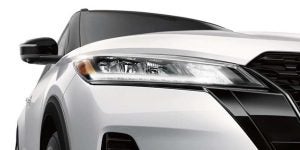
The Nissan Safety Shield® 360 is an advanced all-around protection system that continually monitors the road using cameras, radar, and sonar. The Safety Shield® 360 comprises a suite of individual safety features. Here are the six primary features keeping you safe when you're driving your new Nissan around Rockville, MD and beyond. Blind Spot Warning Every time another vehicle of any size enters one of your blind spots, your Nissan alerts you with a chime and an indicator both on the dashboard and the corresponding door. This way, you can change lanes with confidence, without fear that you might hit an unseen car or motorcyclist. more Lane Departure Warning When drivers are tired or distracted, they sometimes veer towards another lane. This dangerous action is picked up by your Nissan, which constantly monitors the lane markers. You'll then be alerted with a chime and a warning indicator. Automatic Emergency Braking Your Nissan also monitors the road ahead, alert for any suddenly slowing vehicle or a pedestrian or cyclist that veers into your path. If any such collision threat arises, your car gives you a clear audio and visual alert. If you fail to take immediate preventative action, Automatic Emergency Braking will activate to avoid the collision or at least mitigate the impact. Rear Cross Traffic Alert Backing out of tight parking spots or driveways is made far safer with Rear Cross Traffic Alert, which senses approaching vehicles behind your car. If you're ever backing up and a car is approaching, your Nissan will let you know it's there. Rear Automatic Braking Reversing always poses a danger of hitting an object you cannot see. With Rear Automatic Braking, you needn't worry about reversing into tight parking spaces. Your car will detect an imminent impact with a wall, another vehicle, a person, or another small object. It will then apply the brakes to help prevent a collision. High Beam Assist Driving at night poses a greater danger to drivers than in the daytime. Many road accidents happen at night, despite there being fewer vehicles on the road. One of the biggest risk factors at night is visibility. To reduce this risk, car headlights are more powerful than ever before, but this extreme brightness carries its own risks. Drivers often underestimate how dangerous it is to shine high-beam headlights into the eyes of approaching drivers. The sudden glare and reduced vision can lead to sudden errors in judgment and accidents. This threat is greatly reduced in modern Nissan models, which use High Beam Assist to detect oncoming vehicles after dark. The feature lowers the intensity of your headlights as each oncoming car passes and turns the brightness back up once the road is clear again. Explore New Nissan Safety Features Further at Our Rockville Nissan Dealership Visit DARCARS Nissan of Rockville today to learn more about the fantastic safety features in the Safety Shield 360 suite. We're a full-service dealership that takes great pride in the satisfaction of all our customers.

Contact Us

Fill out this form below and we'll contact you shortly
*Required Fields